Local AI vs Cloud Agents: What Leaves Your Machine?
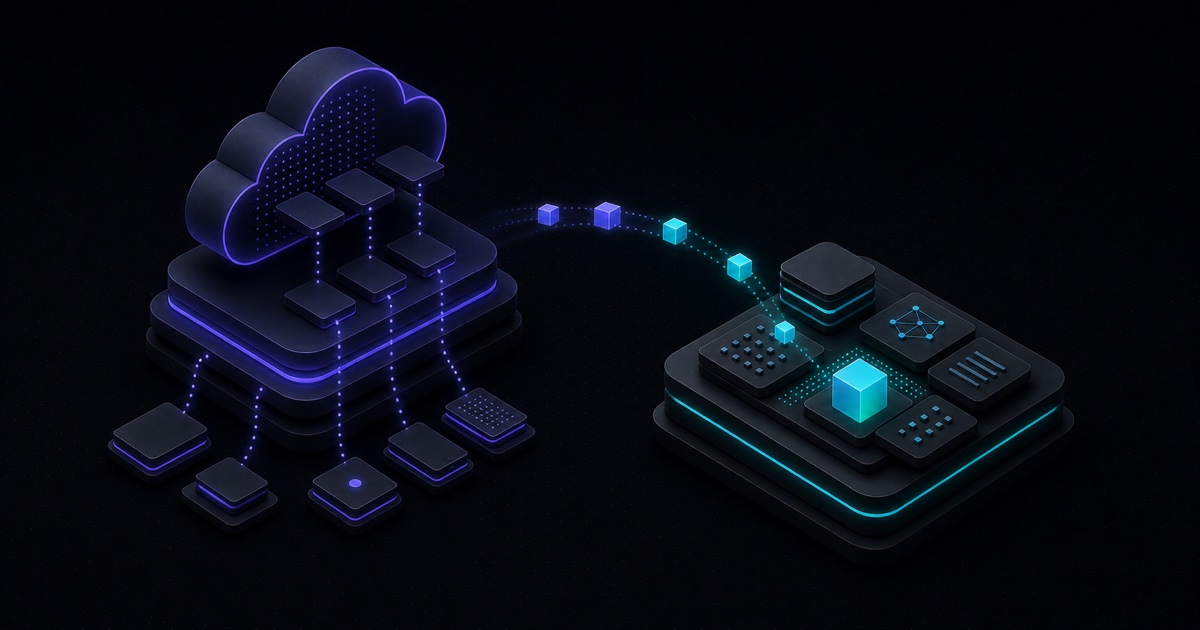
“Local AI” and “cloud agent” get compared as if they were the same choice. They aren't. One is about where the model runs; the other is about where your files and work live. Confuse them and you can end up with a “local” tool that still ships your work to someone else's servers.
At a glance
- Local AI = where the model runs. It says nothing about where your files live.
- Cloud agent = where the workspace lives — files, chats, and history sit on the vendor's servers.
- The two are independent: a local-first tool can borrow a cloud model for one task while your work stays on your machine.
The real question isn't “local or cloud?” It's: what leaves your machine, for which task, and who controls it?
Two questions hide inside “local vs cloud”
A model is just labor: it turns a prompt into an answer, then forgets everything—it keeps no files and has no tools. The agent is everything built around it: your files, history, tools, and the record of what happened.
So there are really two separate questions:
- Where does the model run? On your machine (local), or on a provider's servers (cloud).
- Where does the work live? In a workspace on your machine, or hosted on a vendor's servers.
Think of hiring a consultant. A cloud agent is mailing your filing cabinet to their office—now your work lives at their address. A local-first tool keeps the cabinet at your desk; the consultant comes to you, and can be swapped out next week without moving anything.
That's why “local model” and “cloud agent” aren't opposites—one's a column, the other's a row:
| Workspace \ Model | Local model | Cloud model |
|---|---|---|
| Cloud-hosted | Uncommon; skipped here | Typical cloud agent |
| Local-first | Agenaxy + local model | Agenaxy + selected/approved model |
The matrix is missing one thing: which connections a task is even allowed to make. That's the third decision—and where Agenaxy's two modes come in.
So what is Agenaxy?
Agenaxy is a local-first AI agent workbench: your files and history stay on your machine, you can use any model per task, and Vault narrows a sensitive run to the model connections you explicitly authorize.
Those are three separate decisions—workspace, model, and connections—and Agenaxy lets you set each one deliberately, instead of being a cloud you upload into.
| Layer | Agenaxy's choice |
|---|---|
| Workspace | Local-first — the work stays on your machine |
| Model | Local or cloud, chosen per task |
| Connections | Standard Mode or Vault Mode |
Two connection modes
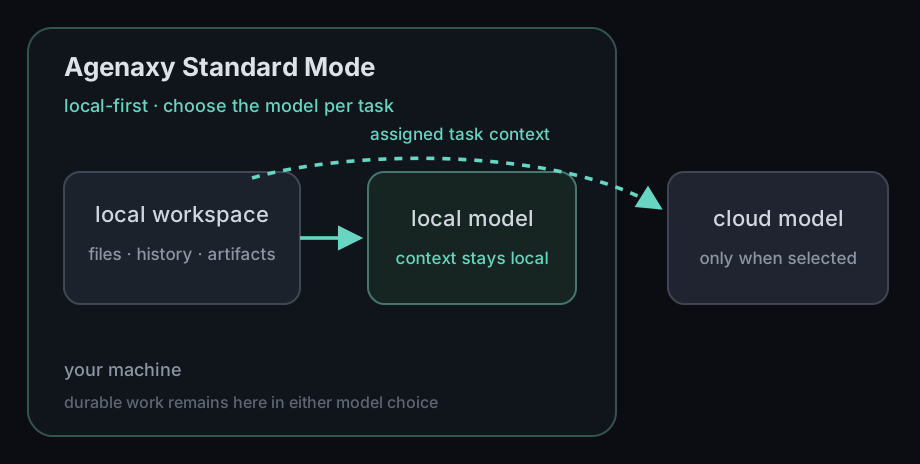
Standard Mode (default): the work stays on your machine and you pick the model per task. Choose cloud and that provider sees the task's context; choose local and no provider sees it—the model runs on your machine.
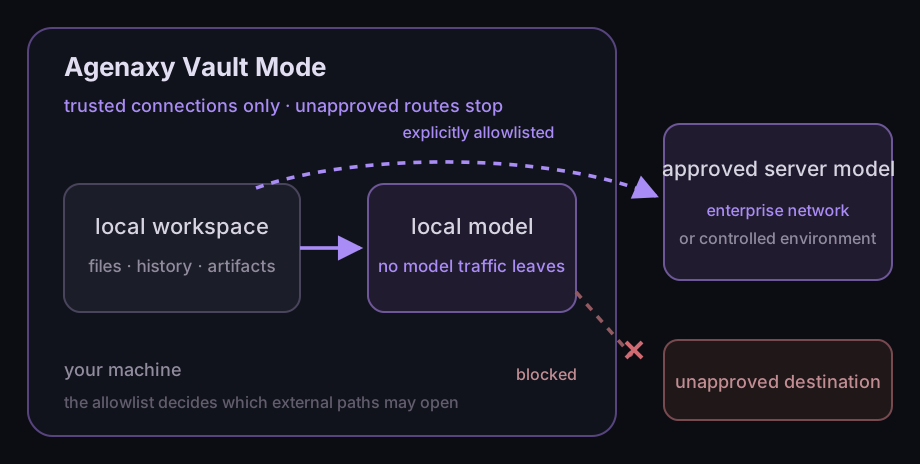
Vault Mode: the same local base, but every model connection must be explicitly authorized by you, and the agent gets only local tools that do not send data out. Scripts run under a system sandbox that denies network access. Anything else is blocked at the operating-system level and tells you why it stopped, instead of quietly finding another route. An authorized connection can point at a local model, a server on your company network, or a cloud endpoint you decide to authorize—Agenaxy enforces your decision, it doesn't vet the destination. Want nothing to leave at all? Authorize only a local model. Read what Vault Mode allows, blocks, and records before using it for sensitive work.
One task, three data paths
Hand an agent a contract and ask it to rewrite one clause. Same task, three very different data trails.
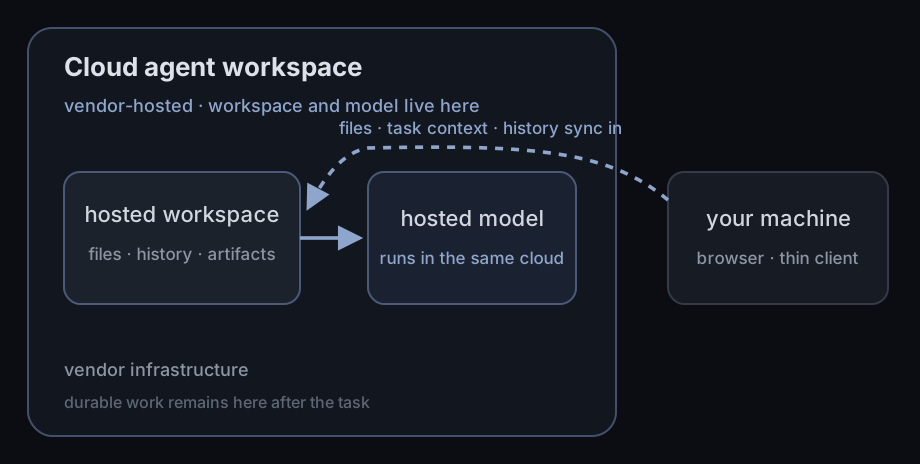
1. Cloud agent workspace
The contract, the prompt, the result, and the history all live on the provider's servers, next to the model. Your laptop is just a window into it.
2. Agenaxy Standard Mode
The contract and the result stay in your local workspace. Pick a cloud model and it sees the clause you're working on; pick a local model and even that stays put.
3. Agenaxy Vault Mode
Same local workspace, but every model connection must be explicitly authorized—no unapproved route out.
Why the boundary is worth checking now
An agent is a bigger risk than a chatbox. Once it can browse, use tools, and act inside your logged-in accounts, a single sentence buried in a web page or a file can hijack what it does with your access—Brave's security team showed exactly this in Perplexity's Comet browser, where a page could make the agent act as the user (Brave, 2025). So “where does the model run?” was never the whole question; what the tools can reach matters just as much.
Which setup fits you?
- Your team already works in the cloud, and the data is fine to host there — a cloud agent workspace fits.
- You want the work on your own machine, but still the best model per task — Agenaxy Standard Mode.
- Data you're responsible for can't go to a third-party cloud AI — customer records, an export full of phone numbers and shipping addresses, a contract under NDA, patient or financial files, unreleased work — Agenaxy Vault Mode. The agent can only reach what you've approved, so nothing is uploaded by accident; if a step needs a connection you haven't trusted, it stops and tells you.
A fully local run isn't a fourth category—it's Standard or Vault with a local model. And it can change per task: a cloud model for public research, a local one for the private files, the same workspace for both.
The test for any tool is three questions: where does the work end up, what does the model actually see, and what can its tools reach?
See the boundary in a real workflow
- Review a confidential contract with source-linked observations
- Build a reviewable month-end close pack from approved exports
- Turn ecommerce exports into a checkable weekly operations brief
- Find source-backed ideas across a private content archive
FAQ
Is local AI the same as a local-first agent?
No. Local AI just means the model runs on local hardware. A local-first agent workbench also keeps your files, tools, history, and outputs on your machine. A local model is one component inside such a workbench.
Can Agenaxy use cloud models?
Yes. In Standard Mode the workspace stays local while a selected cloud model sees the task's context. In Vault Mode, any model connection must first be explicitly authorized—local, self-hosted, or a cloud endpoint you decide to authorize—and anything unauthorized is blocked.
Is Agenaxy a cloud agent?
No. It can call a cloud model for a task, but files, chats, history, and artifacts stay in your local workspace rather than a vendor-hosted one.
Does Vault Mode require a fully offline setup?
No. Vault Mode means trusted connections only, not offline only. It can use a local model, or any endpoint you approve—an enterprise-network server, a controlled private environment, or a cloud provider you choose to trust. For a fully offline run, approve only local connections.
Sources
- Brave — Agentic browser security: indirect prompt injection in Perplexity Comet (2025): https://brave.com/blog/comet-prompt-injection/
- Future of Privacy Forum — AI agents and data protection considerations (2025): https://fpf.org/blog/minding-mindful-machines-ai-agents-and-data-protection-considerations/